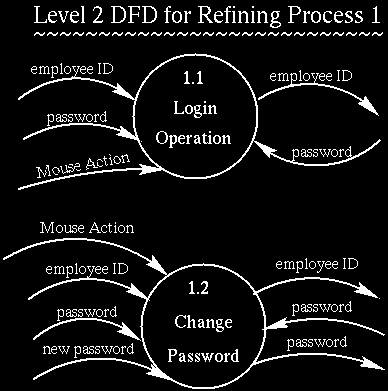
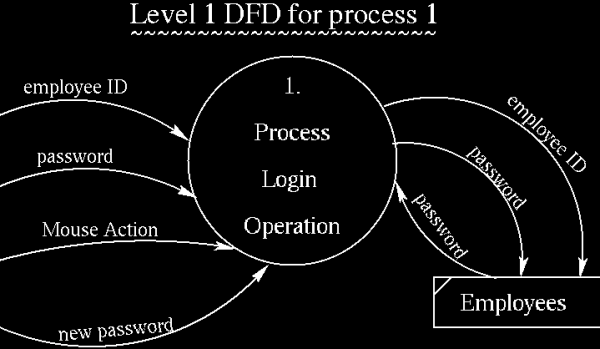
 When the system
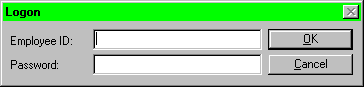
starts up, the user is presented with the window named
"Logon." It contains two fields - Employee ID
and Password. The user has to fill in the Employee ID
field. If the Password field is left blank when the OK
botton is clicked, it transfers to another process, i.e.
change password process which is process 1.2. If the
Password field is filled when the OK botton is clicked,
the system verifies the Employee ID and Password.
When the system
starts up, the user is presented with the window named
"Logon." It contains two fields - Employee ID
and Password. The user has to fill in the Employee ID
field. If the Password field is left blank when the OK
botton is clicked, it transfers to another process, i.e.
change password process which is process 1.2. If the
Password field is filled when the OK botton is clicked,
the system verifies the Employee ID and Password.
A correct entry of Employee ID and Password results in the Main Menu being displayed. However, an incorrectly entered Employee ID and Password results in a dialogue box being displayed which reads "Invalid Employee ID or Password" and then it returns the "Logon" window with both fields cleared.
The user might click on the Cancel botton if he/she wants to clear all entries.
Note that when the password is entered, asterisks are displayed instead of the entered characters.
An employee should not enter an integer value in for the employee ID. Rather and employee is assigned a username which corresponds to the employee ID.
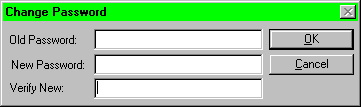 To get
into this process, the user can only type in his/her
Employee ID on the "Logon" window when the OK
button is clicked. Then, the user is presented with the
window called "Change Password." It contains
three fields - Old Password, New Password and Verify New.
Old Password is the password that is currently being used
by the user. New Password is the password that will be
used by the user. The field, "Verify New," is
used for the verification of the new password, so the
value in this field has to be the same as that in the New
Password field. Again, asterisks are displayed on all
fields instead of the entered characters.
To get
into this process, the user can only type in his/her
Employee ID on the "Logon" window when the OK
button is clicked. Then, the user is presented with the
window called "Change Password." It contains
three fields - Old Password, New Password and Verify New.
Old Password is the password that is currently being used
by the user. New Password is the password that will be
used by the user. The field, "Verify New," is
used for the verification of the new password, so the
value in this field has to be the same as that in the New
Password field. Again, asterisks are displayed on all
fields instead of the entered characters.
On success, the Main Menu is displayed. Else, it returns an empty "Logon" window, i.e. go back to the process 1.1.
User may abort this process by pressing the Cancel button resulting in the "Logon" window being displayed.